Algolia provider for Umbraco Search

If you’ve read my previous blog post, you’ll know that:
- Umbraco Search allows for swapping out the default Examine based search provider, and
- I have released search providers for Elasticsearch and Typesense.
I’ve also been working on an Algolia search provider for a while, but I haven’t really been satisfied with it. Until lately. And now, it’s finally released 🎉
The thing is… Algolia doesn’t really fit into the picture. And that’s not necessary a bad thing 👇
Harnessing Algolia
Algolia is powerful. Super powerful, even. It features A/B testing, personalization, recommendations and an entire merchandising studio, just to mention some of the highlights.
On top of that, it also allows for editorial management of both searchable and filterable fields, facet result behavior, relevance scoring and whatnot… all this becomes a bit of a headache for Umbraco Search.
And this is even before InstantSearch is added into the mix 🫣
Don’t get me wrong; it is entirely possible to fit Algolia into an Umbraco Search shaped box while still utilizing the Algolia strengths. I believe I have accomplished that with the Algolia search provider. But it does require Umbraco Search to be in control of both index configuration and query execution, at least to some extent. And that in turn means making compromises for the Algolia editor experience.
Indexing for Umbraco Search
By design, the Umbraco content schema does not really follow any rules. As such, document types can define properties that are in conflict with each other from an indexing perspective.
For example: One document type might define a length property as a numeric input, while another defines length as a textual input. When these two types of documents come together in the same search index, the length field becomes really hard to make sense of.
To mitigate this, Umbraco Search features a higher degree of granularity, which allows fields to be comprised of multiple types without sacrificing indexing and querying capabilities.
The Algolia search provider supports this level of granularity, and from a strictly functional perspective - it works 👍
In all honesty, though… The resulting index data is pretty horrible to look at from an Algolia editor perspective:
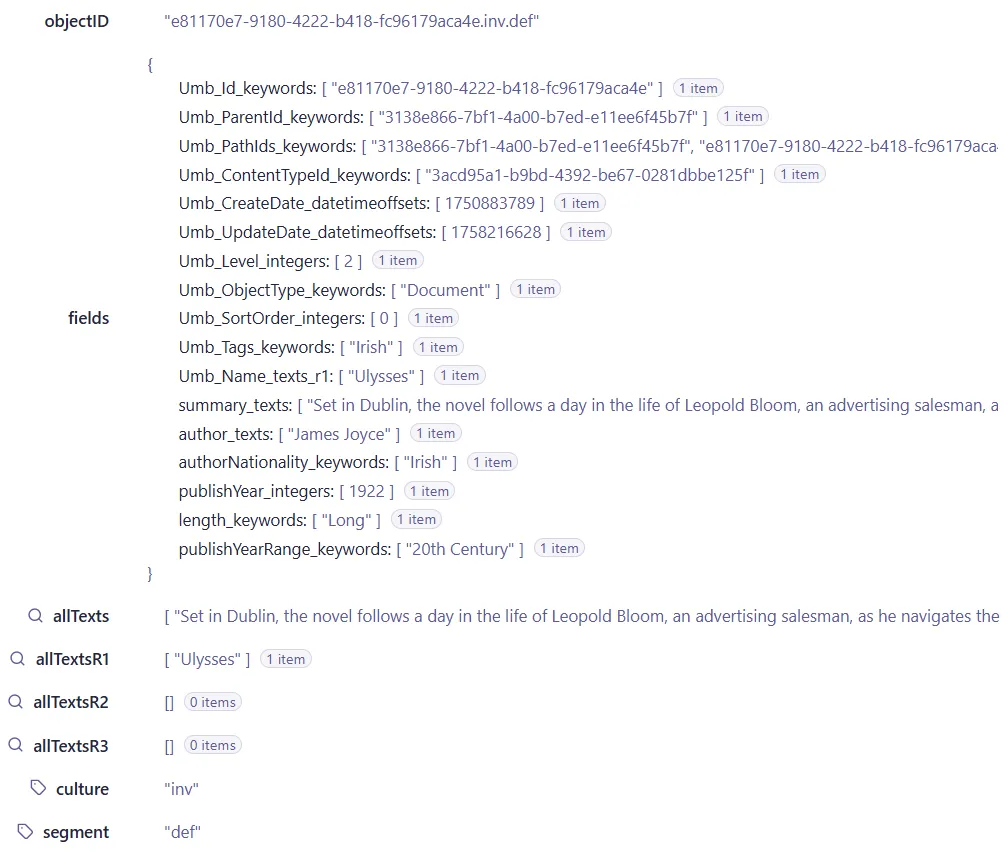
Normally, this kind of data complexity isn’t problematic. Anything goes, as long as the search provider can make heads and tails of it. Also, the data is likely hidden away in some dark corner of a document database 😆
However, since Algolia surfaces the data for the editors, the data complexity becomes a challenge - at least if you’re into editor friendliness.
Indexing for Algolia editors
And this is exactly what’s been bugging me about the Algolia search provider. Yes, it works, and yes, there are a few unresolved issues in the cross field between Umbraco Search and Algolia, but my primary concern is for the Algolia editors.
Perhaps I’m not giving these people enough credit. Or perhaps I’m just all about friendly editor experiences 🤗
What I’m getting at is: To make the most of Algolia, the index data should make sense to the Algolia editors first and foremost.
Or, in other words: Maybe an Algolia search provider for Umbraco Search should focus only on the indexing side of things? Maybe it should concentrate on indexing data that is useful for the Algolia editors, and let the various Algolia client libraries handle all querying? 🤔
Of course, this means a tight coupling to the underlying search technology, which is more or less what Umbraco Search sets out to prevent. In the case of Algolia, though, it might be warranted.
To this end, I have added the IIndexDocumentBuilder interface to the Algolia search provider. This is responsible for building the index documents that are ultimately sent to Algolia.
The default interface implementation builds up the complex data format from the previous section.
Building a simpler data format
To build your own data format, you’ll need to replace the default IIndexDocumentBuilder with your own implementation. The effort involved is likely directionally proportional to the complexity of your Umbraco content model.
Here’s a simplistic example from my Umbraco Search demo site project. It builds up an easy-to-understand data model for the book documents, and discards all other types of documents:
using Kjac.SearchProvider.Algolia.Models;
using Kjac.SearchProvider.Algolia.Services.Indexing;
using Kjac.SearchProvider.Algolia.Site.Models;
using Umbraco.Cms.Core.Models;
using Umbraco.Cms.Search.Core.Extensions;
using Umbraco.Cms.Search.Core.Models.Indexing;
using CoreConstants = Umbraco.Cms.Search.Core.Constants;

namespace Kjac.SearchProvider.Algolia.Site.Services.Indexing;

public class BookIndexDocumentBuilder : IIndexDocumentBuilder
{
    private const string BookContentTypeId = "3acd95a1-b9bd-4392-be67-0281dbbe125f";

    public IEnumerable<IndexDocumentBase> Build(
        Guid id,
        UmbracoObjectTypes objectType,
        IEnumerable<Variation> variations,
        IEnumerable<IndexField> fields,
        ContentProtection? protection)
    {
        IndexField[] fieldsAsArray = fields as IndexField[] ?? fields.ToArray();

        // only index content of type "book"
        var contentTypeId = GetIndexValue(fieldsAsArray, CoreConstants.FieldNames.ContentTypeId)?
            .Keywords?.FirstOrDefault();

        return contentTypeId is BookContentTypeId
            ?
            [
                new BookIndexDocument
                {
                    Id = id.AsKeyword(),
                    Title = GetIndexValue(fieldsAsArray, CoreConstants.FieldNames.Name)?.TextsR1?.FirstOrDefault(),
                    Summary = GetIndexValue(fieldsAsArray, "summary")?.Texts?.FirstOrDefault(),
                    Author = GetIndexValue(fieldsAsArray, "author")?.Texts?.FirstOrDefault(),
                    AuthorNationality = GetIndexValue(fieldsAsArray, "authorNationality")?.Keywords?.ToArray(),
                    PublishYear = GetIndexValue(fieldsAsArray, "publishYear")?.Integers?.FirstOrDefault(),
                    PublishYearRange = GetIndexValue(fieldsAsArray, "publishYearRange")?.Keywords?.FirstOrDefault(),
                    Length = GetIndexValue(fieldsAsArray, "length")?.Keywords?.FirstOrDefault()
                }
            ]
            : [];
    }

    // NOTE: this is only works because the content model happens to be invariant for this site.
    //       variant content models might contain multiple IndexField entries for the same field name.
    private IndexValue? GetIndexValue(IndexField[] fields, string fieldName)
        => fields.FirstOrDefault(field => field.FieldName.InvariantEquals(fieldName))?.Value;
}
…where BookIndexDocument is:
using System.Text.Json.Serialization;
using Kjac.SearchProvider.Algolia.Models;

namespace Kjac.SearchProvider.Algolia.Site.Models;

public class BookIndexDocument : IndexDocumentBase
{
    [JsonPropertyName("title")]
    public required string? Title { get; init; }

    [JsonPropertyName("summary")]
    public required string? Summary { get; init; }

    [JsonPropertyName("author")]
    public required string? Author { get; init; }

    [JsonPropertyName("authorNationality")]
    public required string[]? AuthorNationality { get; init; }

    [JsonPropertyName("publishYear")]
    public required int? PublishYear { get; init; }

    [JsonPropertyName("publishYearRange")]
    public required string? PublishYearRange { get; init; }

    [JsonPropertyName("length")]
    public required string? Length { get; init; }
}
Also, remember to register the BookIndexDocumentBuilder service:
public class SiteComposer : IComposer
{
    public void Compose(IUmbracoBuilder builder)
    {
        // ...

        // register the custom index document builder (specific for indexing only books)
        builder.Services.AddSingleton<IIndexDocumentBuilder, BookIndexDocumentBuilder>();
    }
}
With that in place, the resulting Algolia index data is arguably easier to understand:

Naturally, the querying part of the Algolia search provider is now almost entirely useless. But the Algolia client libraries still work just fine:
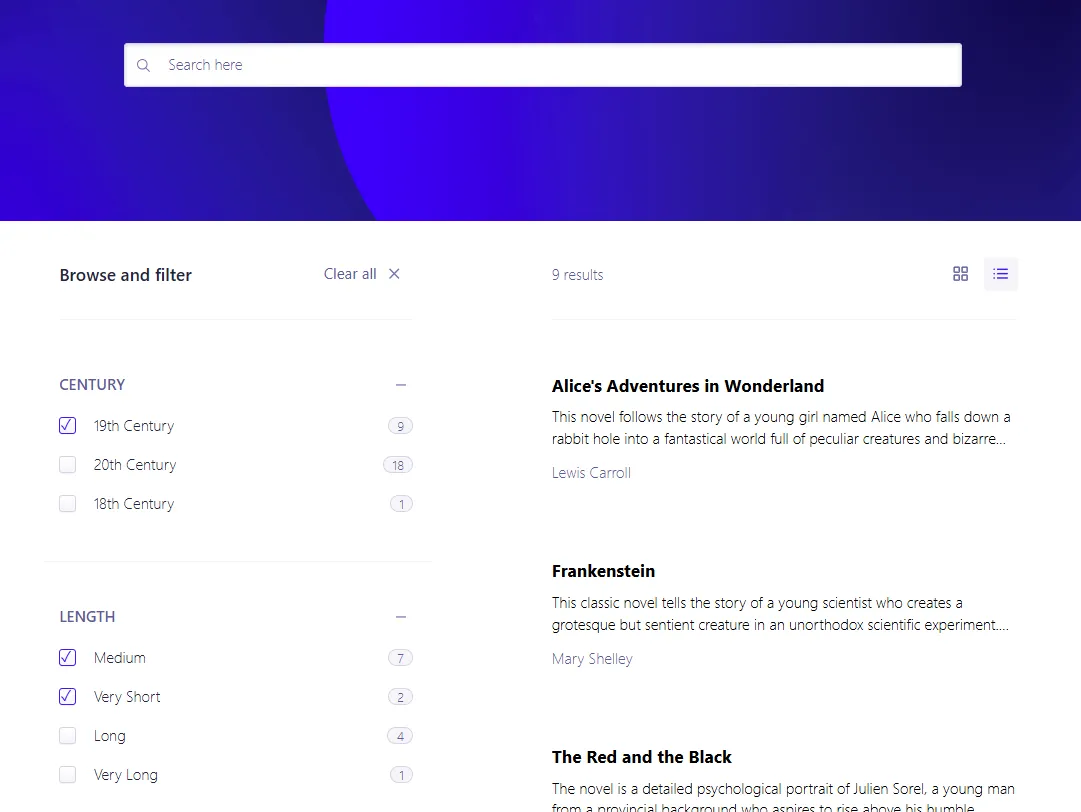
And more importantly, it’s much easier to work with the data in Algolia 💯
Rounding off
Algolia is definitively not just another document database. No wonder it’s a bit hard to fit into an abstraction that also covers more traditional options like Elasticsearch and Typesense.
Still, I’m overall quite pleased with how the Algolia search provider has turned out 😊
That being said, there are a few key concepts where the Algolia search provider differs from other search providers:
- Algolia seemingly does not support range facet. Instead, range values must be calculated at index time.
- The search provider only performs an index configuration for basic for full text search. Fields needed for filtering and faceting must be defined in Algolia.
- Search result sorting is vastly different in Algolia. It involves creating replica indexes per effective sorting, which again must be done in Algolia.
All of this is documented in detail in the search provider GitHub repo.
Happy searching 💜