Searching file content with Umbraco Search

Umbraco lets you search PDF files using the UmbracoExamine.PDF package.
I figured it would be a fun project to build something similar for Umbraco Search. So that’s exactly what I did 🤓
…but with a twist
The UmbracoExamine.PDF package has its way of doing things. I wanted mine to do things a little differently.
Firstly, the file content should be indexed as part of the default media index, rather than into a dedicated index. This makes the file content immediately searchable from the backoffice, which might just help the editors find media items.
Secondly, the implementation should not be limited to PDF files. It should both support multiple file formats out of the box, and be fully extensible for others to add additional file formats.
No added dependencies 🚫
I also did not want to introduce additional dependencies, which rather limited the options out-of-the-box supported file formats. But okay, with an extension model, people can always roll their own 👍
In the end I settled on supporting:
- PDF, powered by PdfPig (same as the UmbracoExamine.PDF package would bring in).
- Markdown, powered by Markdig (already a dependency of Umbraco CMS).
- Text, because it brings no extra dependency - and because it’s easy 😄
A brand-new NuGet package
The result? A NuGet package you can install and play around with 🚀
Of course, the package is free and open source. You’ll find the whole thing in the package repo on GitHub.
Adding your own file formats
As I mentioned, the package is fully extendable, so you can plug in your own handling for other file formats.
Here’s an example of implementing .docx support using the DocSharp.DocX:
using DocSharp.Docx;
using Kjac.SearchExtension.MediaToText.FileIndexing;

namespace My.Site.FileValueHandlers;

public class DocxFileValueHandler : IFileValueHandler
{
    public bool CanHandle(string extension)
        => extension.InvariantEquals(".docx");

    public Task<string> GetFileContentsAsync(Stream stream)
    {
        var converter = new DocxToTxtConverter();
        var text = converter.ConvertToString(stream);
        return Task.FromResult(text);
    }
}
The implementation must be registered with a composer:
using Kjac.SearchExtension.MediaToText.FileIndexing;
using My.Site.FileValueHandlers;
using Umbraco.Cms.Core.Composing;

namespace My.Site.DependencyInjection;

public class DocxFileValueHandlerComposer : IComposer
{
    public void Compose(IUmbracoBuilder builder)
        => builder.Services.AddSingleton<IFileValueHandler, DocxFileValueHandler>();
}
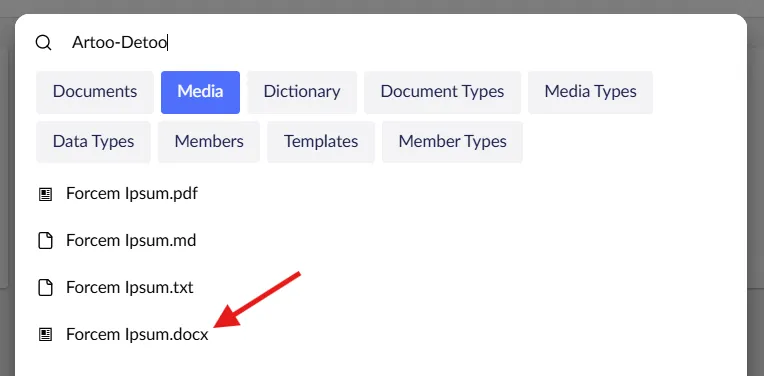
And just like that, .docx can now be searched, alongside the built-in file formats:
Files! Files! Files?
Do we really need file content search anymore? Sure, it’s kinda nice for the backoffice search, but… is it worth the overhead?
Perhaps not. But we can 😝
If nothing else, this was a fun experiment, and a re-validation of the Umbraco Search extension model.
Happy file searching 💜