Secure member auth for the Delivery API
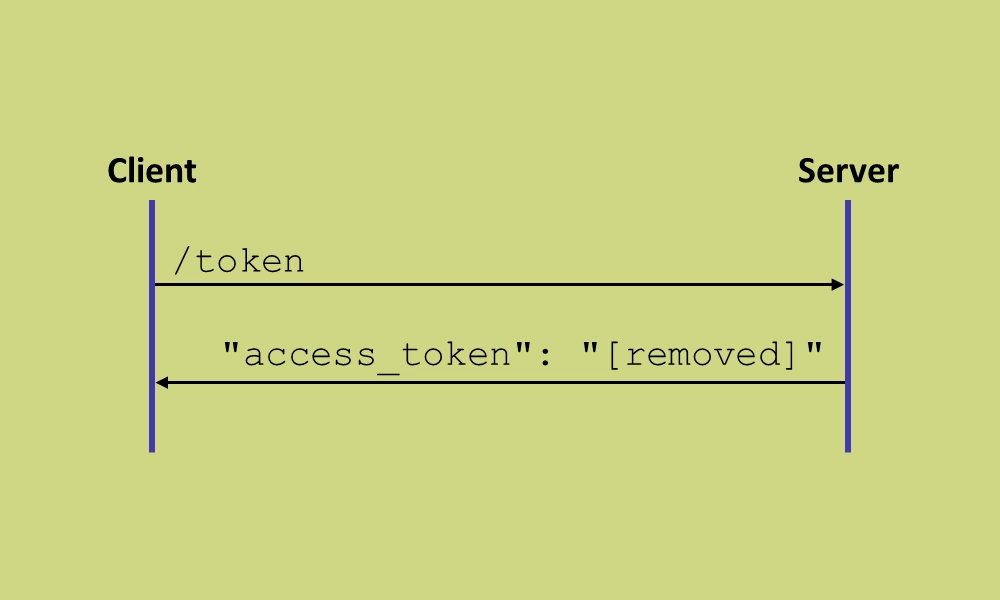
A few months ago, the IETF released a draft RFC outlining best practices for browser-based apps using OAuth 2.0.
As stated in the RFC introduction, the document “focuses on JavaScript frontend applications acting as the OAuth client (…), interacting with the authorization server (…) to obtain access tokens and optionally refresh tokens”.
It is, of course, quite a lengthy document 🤓
One of the key takeaways, and the one I will discuss in this post, is this: Do not expose user access or refresh tokens to a web browser. Period.
The reasoning behind this is, that malicious scripts can intercept user tokens in transit, and even send them off to a third party for exploitation.
With OAuth (or by extension, OpenID Connect), the recommended authorization flow for user interaction is the Authorization Code Flow with Proof Key for Code Exchange (PKCE). This flow requires user access and refresh tokens between the client and the resource server.
If the client is a web application, this is bad.
Unfortunately, it is also a common pattern. Heck, I even wrote a blog post early last year that does this very thing 🙈
What to do?
The RFC recommends introducing a BFF (Backend For Frontend) layer, acting as a trusted middleware between the web application and the resource server. The BFF can use OAuth against the resource server, and handle the web application state using secure, HTTP only cookies, which cannot be read by malicious scripts.
That’s so much easier said than done. Specially if you already have an application with a frontend that relies on OAuth to function 😱
Fortunately, there is a workaround. At least if your resource server is Umbraco, and if you’re using the Delivery API to authorize Umbraco members.
To demonstrate this, I have cloned the sample repo from the original blog post, upgraded it to Umbraco 16 and retrofitted it with the workaround. You’ll find it all in this GitHub repo.
The workaround
The idea is to retain all existing functionality without exposing any exploitable OAuth data to the browser - that is: PKCE codes, access tokens and refresh tokens.
Instead, this data will be passed to the browser in secure, HTTP only cookies, and thus be inaccessible to malicious scripts.
The server will have to:
- Intercept the authorization response and the access token response.
- Write the PKCE codes, access tokens and refresh tokens to cookies.
- Redact the PKCE codes, access tokens and refresh tokens from the response before the authorization flow continues.
Any subsequent requests from the web application should include the cookies, as well as the redacted tokens.
With the right cookie setup, this happens automatically, so the web application can continue to operate as if nothing’s really changed. The server can then:
- Intercept requests for protected resources.
- Read the correct PKCE codes and tokens from their respective cookies.
- Swap the redacted PKCE codes and tokens with the correct ones.
All of this could probably be built with ASP.NET Core filters and/or middleware. But there is a better way 👇
Enter OpenIddict
Umbraco uses OpenIddict to perform much of the heavy lifting for OpenId Connect. It is an awesome stack, not least because it’s extremely extendable. And it’s open source 🫶
OpenIddict exposes a ton of events to pin code against. I have wired up the ones I need in a composer:
public class HideMemberTokensComposer : IComposer
{
    public void Compose(IUmbracoBuilder builder)
        => builder.Services
            .AddOpenIddict()
            .AddServer(options =>
            {
                options.AddEventHandler<OpenIddictServerEvents.ApplyTokenResponseContext>(
                    configuration =>
                    {
                        // Add a handler here to intercept the access token response.
                        // It should move the access and refresh tokens to cookies,
                        // and redact them from the response.
                    });
                options.AddEventHandler<OpenIddictServerEvents.ApplyAuthorizationResponseContext>(
                    configuration =>
                    {
                        // Add a handler here to intercept the PKCE code response.
                        // It should move the PKCE code to a cookie, and redact it
                        // from the response.
                    });
                options.AddEventHandler<OpenIddictServerEvents.ExtractTokenRequestContext>(
                    configuration =>
                    {
                        // Add a handler here to contextualize requests for the refresh
                        // token endpoint. It should read the refresh token from its
                        // cookie and apply it to the request context.
                    });
            })
            .AddValidation(options =>
            {
                options.AddEventHandler<OpenIddictValidationEvents.ProcessAuthenticationContext>(
                    configuration =>
                    {
                        // Add a handler here to contextualize requests for protected resources.
                        // It should read the access token from its cookie and apply it to the
                        // authentication context.
                    });
            });
}
I have removed the actual event handler configuration for brevity, but here’s a link to the full composer in the GitHub repo.
I also won’t go into details on the actual event handler implementation here. While it’s not really that complicated, it would kinda throw this whole blog post off its track. I’ve added a bunch of comments to the implementation, so you should be able to make heads and tails of it just fine 🤞
Additional required changes
A few more things need to change to make the workaround actually work.
Sending cookies to the server
The client must obviously send the cookies to the server. That is - it needs to include credentials in all requests.
Since the client and server run on different hosts, the fetch requests need to include cookies from another host, which means the credentials option must be include.
I was rather expecting this to simple and straight-forward. The client uses AppAuth for JS, and I naively thought it would have an option to include credentials in its token requests.
Apparently, I was wrong 😣
Or perhaps more to the point - I couldn’t figure out how to bend AppAuth to my will, and eventually my patience ran out… so I monkey-patched fetch instead 🙉
const { fetch: originalFetch } = window;
window.fetch =  async (...args) => {
    const [resource, config ] = args;
    // since the client performs cross-origin requests,
    // the credentials option must be 'include'
    config.credentials = 'include';
    try {
        return await originalFetch(resource, config);
    } catch (error) {
        console.error('Error fetching data:', error);
        throw error;
    }
};
While this works, it’s also rather dirty. Here’s hoping you can come up with a smarter solution in your app 😅
Accepting cookies on the server
The server must of course also accept the cookies from the client fetch requests.
With the client and server running on different hosts, this becomes a CORS matter, and thus adjustments must be made to the ConfigureCorsComposer.
Specifically, the CORS policy for the client needs to include .AllowCredentials(), otherwise the credentials passed from the client will be rejected ⛔
The end result
With the workaround applied, the access tokens (and refresh) are redacted from the token endpoint response:
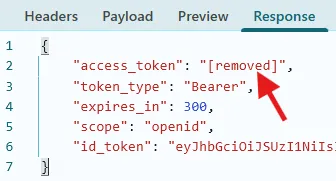
…and you’ll find the access token cookie in the response headers:

When fetching data from the Delivery API, the redacted access token and the new cookie will be passed along for authentication:

Third party cookies 🍪
The workaround has one major drawback. If the client and server runs on different hosts, these new cookies are perceived as third-party cookies… meaning they are subject to a lot of limitations.
Case in point: When requesting the sample client in private (incognito) browsing mode, no protected content is read from the Delivery API, because the browser blocks third-party cookies by default:
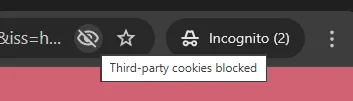
If you look closely, you’ll see that React throws an error before the browser reloads. This is because the redacted PKCE code cannot be exchanged for an access token:

If you implement the workaround, you will need to consider how to handle this scenario gracefully.
Summing it all up
There is no doubt that this is a workaround 🛠️
Not only would a BFF layer would be a cleaner solution; it would also remove all the headaches that cookies bring - provided of course that both the client and the BFF run on the same host.
That being said, I do think it’s an acceptable workaround. If nothing else then as a temporary solution, if you’re not in an immediate position to rewrite your entire client authentication flow 👍
From a security standpoint, the workaround is certainly “secure enough”. There is no exploitable OAuth data floating around that attackers can misuse. And as it happens, a very similar approach is implemented in Umbraco 16.4 and 17.0, as the first step towards creating a BFF layer for the backoffice client.
Since the client and server run on different hosts in this example, the token cookies must use SameSite=None - otherwise the client won’t include them in the API requests. If your client and server runs on the same host, you really should use SameSite=Strict instead. It can be changed in the SetCookie() method of HideMemberTokensHandler.
Happy hacking 💜